 ShinyfinityOpen generator
Gridfinity bins and baseplates, sized for your drawers.
Shinyfinity is a free browser-based Gridfinity generator. Create parametric bins, fit a baseplate to your drawer and preview the arrangement in 3D before exporting models for printing.
The interactive editor is available on desktop and laptop computers. Use a mouse to orbit the view, move bins and resize them on the Gridfinity grid.
Fit a baseplate to your drawer
Set the drawer width, depth and inner height. The generator calculates how many 42 mm Gridfinity cells fit and fills the remaining space with integrated side padding. The padding is joined to the outer baseplate tiles, so it is part of the printed model.
Choose Thin, Weighted, Skeletonized, Screw Together, Screw Together (minimal), or GridFlock baseplates. Adjust side screw connections on Screw Together plates, or choose intersection and edge puzzle connectors with GridFlock. Geometry is generated from the open-source Gridfinity Rebuilt and GridFlock OpenSCAD models.
Arrange custom bins in 3D
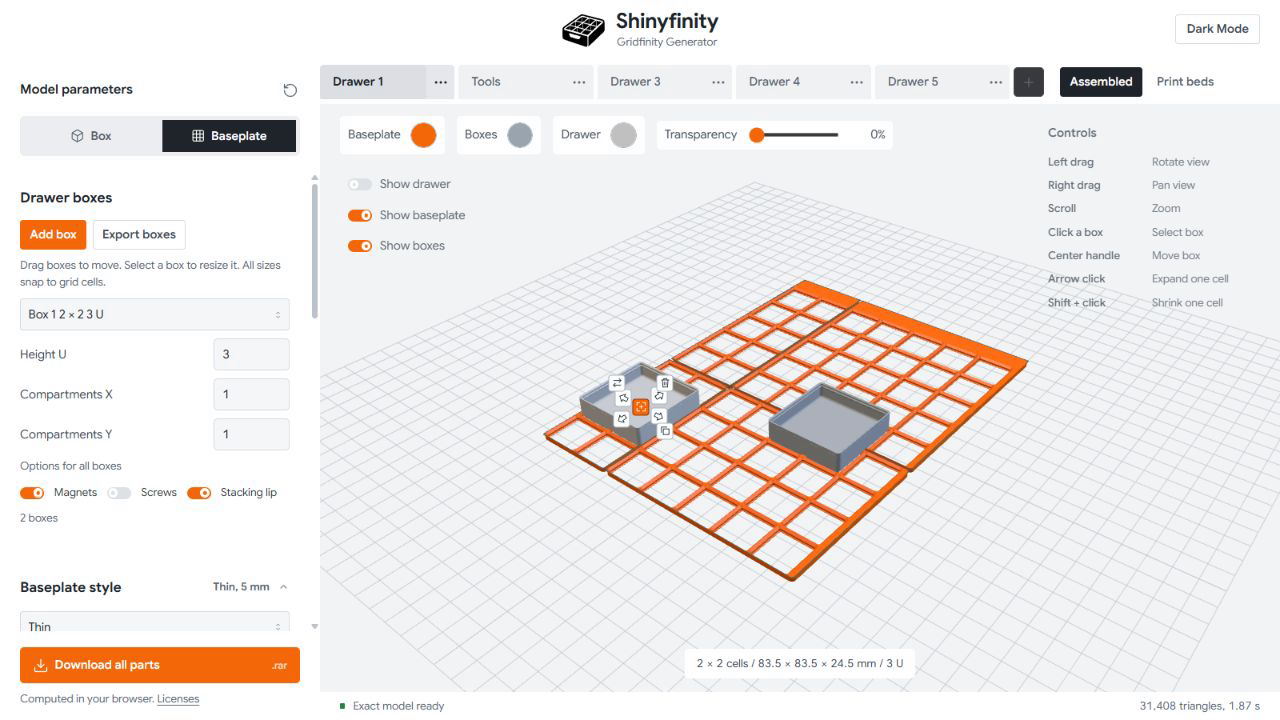
Add bins, drag them to free cells and resize them using the handles inside the selected bin. Adjust height and compartments, rotate, duplicate or remove bins. Magnets, screws and stacking-lip options apply to all bins in the current drawer.
Split models for your printer
Select a Bambu Lab, Prusa, Creality, Snapmaker or Elegoo print-area preset, or enter custom dimensions. Baseplates are split into printable tiles and the Print beds view shows their arrangement. The assembled view shows how the pieces fit together.
Export STL and 3MF files
Download a RAR archive containing separate Bins and Baseplate folders with STL files, plus a 3MF assembly with objects grouped by the configured print beds. Slicer support for plate metadata can vary; check the imported layout before printing.
Keep several drawer layouts
Save up to ten drawers in browser tabs. Rename a drawer, start a new one or duplicate its dimensions, baseplate and bins. Layouts are stored in this browser, so clearing site data removes them.
Local model generation
Model calculations run in your browser using OpenSCAD WebAssembly and Web Workers. Your drawer dimensions and bin arrangements are not sent to a modeling server. A desktop browser with JavaScript, WebAssembly and WebGL is required for the editor.
Plan a drawer. Generate parts for printing.
Shinyfinity is a free browser-based Gridfinity drawer planner and bin generator. Fit baseplates to your drawer, arrange custom bins in 3D and export models without installing CAD software or creating an account.
How to plan your first drawer
- Measure the usable space. Measure the inside width, depth and height of your drawer in millimetres. Allow for handles, runners and other obstructions.
- Set up Drawer planner. Enter your drawer dimensions, choose a baseplate style and select your printer's build area. Review the integrated padding and printable tile layout.
- Arrange your bins. Add bins, move and resize them on the grid, then set their height and compartments. Optional scoops and label tabs help organise small parts.
- Review and export. Check the assembled view and print beds, then download the parts. Inspect dimensions and the imported layout in your slicer before printing.
A simple drawer example
A 300 × 200 mm drawer accommodates a 7 × 4 array of 42 mm Gridfinity cells: a nominal grid footprint of 294 × 168 mm. The remaining 6 mm and 32 mm describe space outside that nominal grid, not exact printed padding dimensions. Shinyfinity calculates the actual model dimensions and integrated padding. Check usable height and print a small fit sample before committing to a full drawer.
Frequently asked questions
Is Shinyfinity free? Do I need an account?
The generator is free to use and does not require an account.
Can I use it on a phone?
You can read this guide on a phone. The interactive editor requires a desktop or laptop with a larger screen and a mouse, plus a browser supporting WebGL and WebAssembly.
Can I generate a single bin?
Yes. Choose Single bin on a computer to configure a bin independently, or use Drawer planner to arrange multiple bins and a baseplate together.
Which files can I download?
The drawer package is a RAR archive containing STL parts in Bins and Baseplate folders and a 3MF assembly. Support for print-bed metadata varies by slicer; verify the imported layout.
Where are my designs stored?
Drawer layouts are saved in this browser's local storage. Geometry is generated on your device; drawer dimensions and models are not uploaded to a modeling server. Clearing site data removes saved drawers. There is no cloud sync.
Which bin features are available?
Adjust size, height and compartments, with options for scoops, label tabs, magnets, screws and a stacking lip. Label tabs are available from 3 U. Check the preview and slicer before printing.
Are the models guaranteed to fit?
Fit depends on measurements, printer calibration and material. Shinyfinity uses Gridfinity Rebuilt model sources, but this does not replace a physical fit test. Start with a small sample and check magnet and screw fit separately.
Based on Gridfinity Rebuilt and GridFlock
Shinyfinity uses Gridfinity Rebuilt. Puzzle-connected baseplates use GridFlock by Jonas Konrad. Gridfinity was created by Zach Freedman. See the licenses and bundled source for attribution and license details. Shinyfinity is an independent tool.